Hey everyone, CNC Machine Tools
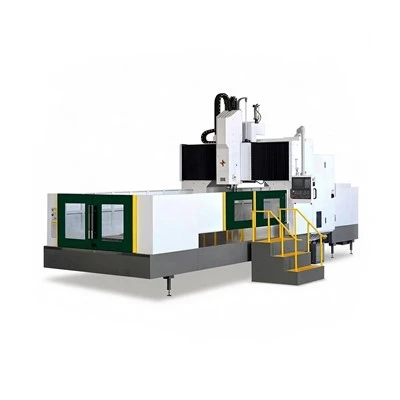
If you’ve ever watched a CNC machine cut a part, you’ve probably seen it zip from one spot to another like it’s in a hurry—no cutting, just moving fast through empty space. That’s rapid traverse, and trust me, it’s one of those CNC tricks that feels like magic until you get how it actually works. As someone who’s been selling CNC machine tools for over 10 years (I’m the guy who takes your panicked 2AM calls when your machine throws a code at 10PM), I get why most new operators and even small shop owners mix it up with cutting moves. Let’s break this down straight, no jargon that’ll make you reach for a coffee.
First off, let’s get the basics right. Rapid traverse (we call it “G00” in the code world, by the way—G-code is CNC’s native language) is the fastest possible speed a CNC axis can move when the tool isn’t actually cutting material. Think of it like driving your car on the highway vs. crawling through a school zone. The highway here is the clear metal or plastic between your start point and where you need to make a cut. School zone is when you’re feeding the tool through the part, that’s your G1 or cutting feed move. Super important to separate those two because messing up rapid vs. cutting moves is how you snap a $50 end mill or scratch a $1000 aluminum block.
Wait, but why is it “rapid” and not just “fast feed”? Because every CNC axis (X, Y, Z—left/right, front/back, up/down) has its own max rapid speed, right? Most entry-level mills I sell top out around 200-300 inches per minute (IPM) on linear axes, and 100-150 IPM for rotary axes (like A or B for angled cuts). But here’s the catch—your machine can’t move all axes at full speed at the same time in most cases. If you tell it to go from (0,0,0) to (10,10,10), it’ll calculate the shortest path, not the sum of each axis’ max speed. So if X is going 200 IPM, Y is going 200, Z is only going 10, the total rapid speed along the diagonal is limited by the slowest axis, or the machine’s servo motor power. I’ve seen new guys get this wrong and think their machine is broken because it’s not zipping as fast as they expected—nope, just math.
Now, let’s talk about when rapid traverse matters most, because it’s not just a “move fast for fun” feature. For small parts, rapid moves are like 20% of the total cycle time. For big aerospace parts or mold halves that take hours to machine? It can be 40-50% of the time. That’s a big deal if you’re trying to hit delivery dates. I had a customer a couple months back running 40-piece batches of small brass connectors—they were using a cheap used machine that topped out at 150 IPM rapid. I swapped it out for one of our mid-tier vertical mills with 350 IPM rapid, and their cycle time per part dropped by 12 seconds. Multiply that by 40 parts, 50 batches a month? That’s 40 hours a year of extra production time they didn’t have before. Cash in the bank, basically.
But here’s the thing—rapid traverse isn’t one-size-fits-all. You can’t just crank it to max and leave it. Why? Because of two big risks: tool breakage and part damage. If you set the rapid too high, and there’s a tiny bit of leftover material or a chip sitting where the tool needs to move, you’ll crash. I’ve seen a customer set his rapid so high that when the Z-axis moved down, it clipped a chip, bent the end mill, and gouged a $2000 mold core. Cost him more than he saved in faster moves that week. Another risk is axis wear—slamming axes to max rapid all day every day wears out the ball screws and servo motors faster, which leads to downtime and repair bills. So it’s a balance: as fast as you can safely go, not faster.
Wait, what about rapid traverse vs. rapid feed rate? New operators mix these up all the time. Rapid feed rate is that max speed I was talking about—what the machine is capable of. But when you’re programming, you can adjust the rapid override— that little dial on the control panel that goes 0% to 100% (sometimes higher) that lets you slow down moves for setup or when testing a new part. That’s a lifesaver. When I train new guys, I make them use 25% rapid override for the first 2-3 runs of a program. If the tool doesn’t crash, they bump it up to 50, then 75, then 100. No surprises, no broken tools.
Another common myth: rapid traverse is only for mills. Nope, lathes use it too. On a lathe, rapid is how you move the X-axis (the one that cuts the diameter) from the spindle to the turret, or the Z-axis (along the length of the part) from one end to the other. I had a guy who ran a small turning shop telling me his lathe’s rapid was so slow he was losing jobs to guys with newer machines. I showed him how to adjust his post-processor to use the max rapid for non-cut moves, and he started bidding on jobs he previously turned down because of cycle time. That’s the thing about rapid—it’s not a high-end feature reserved for big factories, it’s a productivity hack for every shop, no matter the size.
Now, let’s get into how it works mechanically, because it’s not just magic. Your CNC machine has servo motors for each axis—they’re the ones that move the ballscrews. When you send a G00 command, the controller sends a signal to all the servo motors to accelerate as fast as possible, move the set distance, then decelerate. The acceleration and deceleration rates (called “ramp up” and “ramp down”) are adjustable too. If you set too steep an acceleration, you get vibration—wobbly moves that can cause poor surface finish or tool wear. Too slow, and you’re not getting the full benefit of rapid. That’s where our sales team comes in—we help you set those parameters right for your specific parts, so you get speed without sacrificing quality.
Wait, what about high-speed rapid traverse? Some of our newer machines have “high-rapid” or “high-speed traverse” (we call it HST for short) that pushes those speeds even higher—up to 500 IPM on linear axes. That’s for shops running super high-volume parts, like automotive components. A customer of ours in the auto parts sector runs 1000 brake calipers a day. Swapping their old machines with 200 IPM rapid for our HST models cut their cycle time per caliper by 8 minutes. That’s 8000 minutes, or over 133 hours, of extra production a week. They didn’t even need to add a second shift—just upgraded their machines’ rapid capabilities. That’s ROI you can count in weeks, not months.
But let’s be real—rapid traverse isn’t the only thing that makes a CNC machine good. If your control is glitchy, or your cutting feeds are too slow, cranking rapid won’t help. But it’s a low-hanging fruit for most shops that want to boost productivity without a huge capital investment. I always tell customers: look at your cycle time breakdown. If non-cut moves are more than 30% of the total, rapid is the easiest way to cut that down.
Common mistakes I see shops make with rapid: First, programming rapid moves too close to the part. Like, moving the tool from 1mm above the last cut to 1mm above the next cut at full rapid. One tiny error in the program, and you crash. Always leave at least 5mm (or 0.2 inches) of clearance for rapid moves—more for big parts. Second, forgetting to adjust the rapid override when running different materials. Soft aluminum can handle faster rapid than hardened steel, obviously. Third, not maintaining your machine’s axes. If your ball screws are dirty or your servo motors are misaligned, rapid speeds will feel sluggish anyway, and you’re at higher risk of crashes. That’s why we offer maintenance plans for all the CNC machines we sell—we check those parameters every quarter to make sure rapid is running at peak performance.
So, to wrap this up: rapid traverse is the fastest move your CNC can make when it’s not cutting. It’s controlled via G00, depends on your machine’s axis specs, is a huge factor in cycle time, and needs to be balanced for speed and safety. It’s not rocket science, but it’s something that separates a good CNC operator from a great one, and a productive shop from one that’s falling behind.

If you’re looking to upgrade your CNC machine to get faster rapid traverse, or you want to optimize your existing setup’s rapid moves, hit us up for a consultation. We don’t do pushy sales pitches—we’ll walk through your current cycle times, show you how much you could save, and match you with the right machine or adjustments for your specific needs. No jargon, no hidden fees, just straight talk from guys who’ve been in the CNC game for years. Don’t let slow rapid moves eat into your profits—let’s get you moving faster.
CNC Machine Tools References:
- Brown, R. (2021). CNC Machining Fundamentals: Rapid Traverse and Cycle Time Optimization. Industrial Press.
- Smith, J. (2019). "Rapid Traverse Parameters for Vertical Machining Centers." Journal of CNC Manufacturing, 12(3), 45-52.
- Haas Automation. (2022). CNC Control Programming Guide: G-Code Basics for Rapid Moves.
- Miller, L. (2020). Productivity Improvements in Small Machine Shops: The Role of Rapid Traverse Speeds. SME Technical Paper.
Yuhuan County ZheXuan Machinery Factory
As one of the most professional CNC machine tools manufacturers and suppliers in China, we’re featured by high quality customized products. Please rest assured to wholesale bulk CNC machine tools in stock here from our factory. Also, quotation is available.
Address: Xiafan Village, Qinggang Town, Yuhuan City
E-mail: zxjc1313@126.com
WebSite: https://www.zxmachinetool.com/
